DaVinci Resolve 04
『DaVinci Resolve』にデフォルト設定されている基本ショートカットキーをまとめてみました。
ぜひ参考にしていただければ幸いです。
*『DaVinci Resolve』圧倒的作業効率化!!頻繁に使用する基本ショートカットキー⬇︎⬇︎
全般/エディットページ
全般
| 取り消す | command+ Z |
| やり直す | shift+ command+ Z |
| カット | command+ X |
| コピー | command+ C |
| ペースト | command+ V |
| 全てを選択 | command+ A |
| 環境設定 | command+ . |
| DaVinci Resolveを隠す | command+ H |
| DaVinci Resolveを終了 | command+ Q |
| プロジェクトを保存 | command+ S |
| 全画面表示 | P |
Windowsの場合 command➡︎ Ctrl、option➡︎ alt
タイムラインの拡大と縮小
| 最適サイズ化 | shift+ Z |
| 拡大 | command+ = |
| 縮小 | command+ ^ |
Windowsの場合 command➡︎ Ctrl、option➡︎ alt
編集
Windowsの場合 command➡︎ Ctrl、option➡︎ alt
編集方法
| 選択モード | A |
| トリム編集モード | T |
| ブレード編集モード | B |
| ダイナミックトリムモード | W |
| トランジションを追加 | command+ T |
| スワップ | command+ shift+ ドラッグ |
| 前のクリップと置き換え | command+ shift+ , |
| 次のクリップと置き換え | command+ shift+ . |
| パーシャル・スワップ | option+ shift+ ドラッグ |
Windowsの場合 command➡︎ Ctrl、option➡︎ alt
選択
| 最も近いクリップを選択 | shift+ V |
| 最も近い編集点を選択 | V |
| 編集点の種類 | U |
Windowsの場合 command➡︎ Ctrl、option➡︎ alt
クリップの追加
| 挿入 | F9 |
| 上書き | F10 |
| 置き換え | F11 |
| トラックの最上位に編集 | F12 |
| リップル上書き | shift+ F10 |
| 空きに合わせる | shift+ F11 |
| 末尾に追加 | shift+ F12 |
Windowsの場合 command➡︎ Ctrl、option➡︎ alt
マーク
| イン点をマーク | I |
| アウト点をマーク | O |
| イン点とアウト点を削除 | option+ X |
| クリップをマーク | X |
| マーカー | M |
| マーカーの追加/修正 | command+ M |
Windowsの場合 command➡︎ Ctrl、option➡︎ alt
ページ
| プロジェクトマネージャー | shift+ 1 |
| プロジェクト設定 | shift+ 9 |
| メディアページ | shift+ 2 |
| エディットページ | shift+ 4 |
| Fusionページ | shift+ 5 |
| カラーページ | shift+ 6 |
| Fairlightページ | shift+ 7 |
| デリバーページ | shift+ 8 |
Windowsの場合 command➡︎ Ctrl、option➡︎ alt
カラーページ
スコープ
Windowsの場合 command➡︎ Ctrl、option➡︎ alt
ビューワーの拡大
| シネマビューワー | command+ W |
| エンハンスビューワー | shift+ W |
| フルスクリーンビューワー | option+ W |
| ライトボックス | shift+command+ F |
Windowsの場合 command➡︎ Ctrl、option➡︎ alt
ワイプとスプリットスクリーン
| ワイプを表示 | command+W |
| ワイプの種類を変更 | shift+W |
| ワイプの反転 | option+W |
| スプリットスクリーン | option+command+W |
Windowsの場合 command➡︎ Ctrl、option➡︎ alt
ハイライト
| ハイライト | shift+ H |
| B/W ハイライト | shift+ option+ H |
| 差分ハイライト | shift+ command+ H |
Windowsの場合 command➡︎ Ctrl、option➡︎ alt
再生
| 再生 | L |
| 逆再生 | J |
| 停止 | K |
| 早送り | shift+ L |
| 早戻し | shift+ J |
| 一時停止/再生 | space |
| ループ/ループの解除 | command+ / |
| 1フレーム進む | ➡︎ |
| 1フレーム戻す | ⬅︎ |
| 1秒進む | shift+ ➡︎ |
| 1秒戻す | shift+ ➡︎ |
| 前のクリップへ移動 | ⬆︎ |
| 次のクリップへ移動 | ⬇︎ |
| 最初のフレームへ移動 | ; |
| 最後のフレームへ移動 | : |
| 前のキーフレームへ移動 | [ |
| 次のキーフレームへ移動 | ] |
| 前のマーカーへ移動 | shift+ ⬆︎ |
| 次のマーカーへ移動 | shift+ ⬇︎ |
| 全画面表示 | P |
Windowsの場合 command➡︎ Ctrl、option➡︎ alt
ノード
| シリアルノードを追加 | option+ S |
| シリアルノードを前に追加 | shift+ S |
| パラレルノードを追加 | option+ P |
| レイヤーノードを追加 | option+ L |
| ノードを末尾に追加 | option+ K |
| アウトサイドノードを追加 | option+ O |
| スプリッター・コンバイナー | option+ Y |
| シリアルノード+CPW | option+ C |
| シリアルノード+LPW | option+ Q |
| シリアルノード+PPW | option+ G |
| シリアルノード+PCW | option+ B |
| 現在のノードを無効化 | command+ D |
| すべてのノードを無効化 | option+ D |
| すべてのグレードを無効化 | shift+ D |
| 選択されたノードを初期化 | shift+ fn+ ⬅︎ |
| グレードとノードを全部削除 | command+ fn+ ⬅︎ |
Windowsの場合 command➡︎ Ctrl、option➡︎ alt
ギャラリー
| スチルを保存 | option+ command+ G |
| スチルをロード | option+ command+ F |
| 前のスチルへ移動 | option+ command+ P |
| 次のスチルへ移動 | option+ command+ N |
Windowsの場合 command➡︎ Ctrl、option➡︎ alt
メモリー
| プレビューメモリー | option+shift+C |
| オリジナルメモリー | option+shift+O |
| メモリーA−Hをロード | command+1〜8 |
| メモリーA−Hを保存 | option+1〜8 |
Windowsの場合 command➡︎ Ctrl、option➡︎ alt
バージョン
| バージョンを追加 | command+ Y |
| デフォルトバージョンに移動 | command+ U |
| 前のバージョンに移動 | command+ B |
| 次のバージョンに移動 | command+ N |
Windowsの場合 command➡︎ Ctrl、option➡︎ alt
Resolve Live
| Resolve Live を起動 | command+ R |
| フリーズ | shift+ command+ R |
| スナップショット | option+ command+ R |
Windowsの場合 command➡︎ Ctrl、option➡︎ alt
キーボードカスタマイゼーション
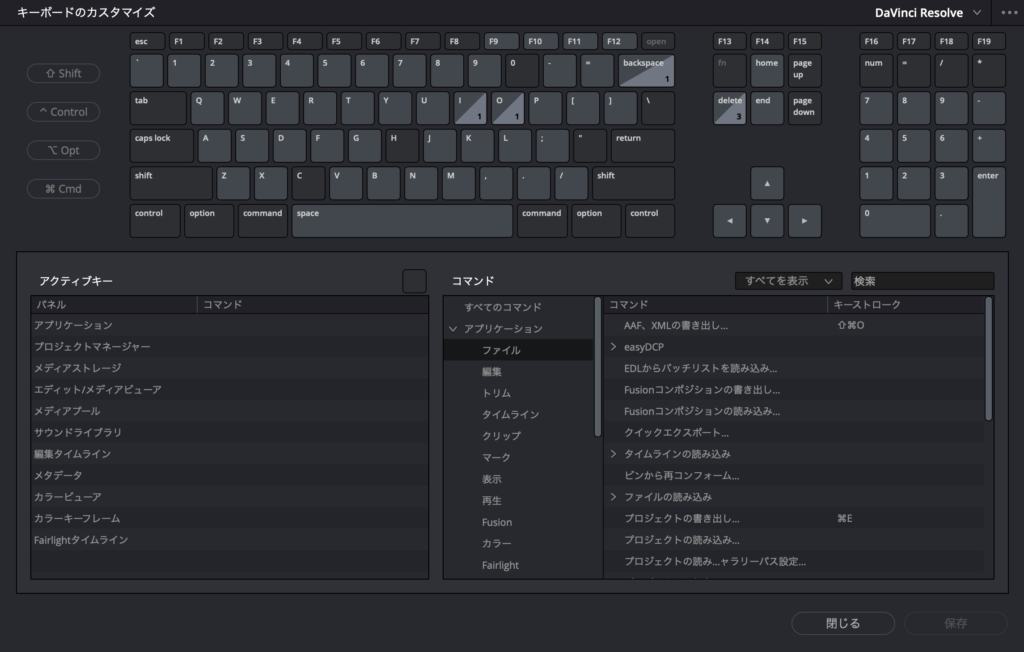
『DaVinci Resolve』ではキーボードカスタマイゼーションでショートカットキーの割り当てが可能です。
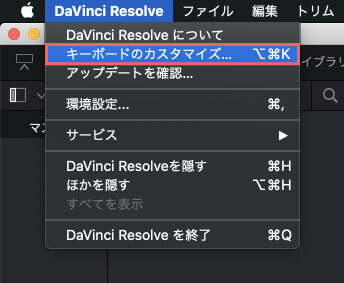
キーボードカスタマイゼーションを開くには、上部メニューのDaVinci Resolve ➡︎ キーボードカスタマイズを選択するか

command(Ctrl)+ option(alt)+ Kで開くことができます。
作業効率化に向けて地道にアレンジしていきましょう。

*【DaVinci Resolve】圧倒的作業効率化!!頻繁に使用する基本ショートカットキーを紹介した記事はこちら⬇︎⬇︎
以上、最後まで読んでいただきありがとうございました♪( ´θ`)ノ